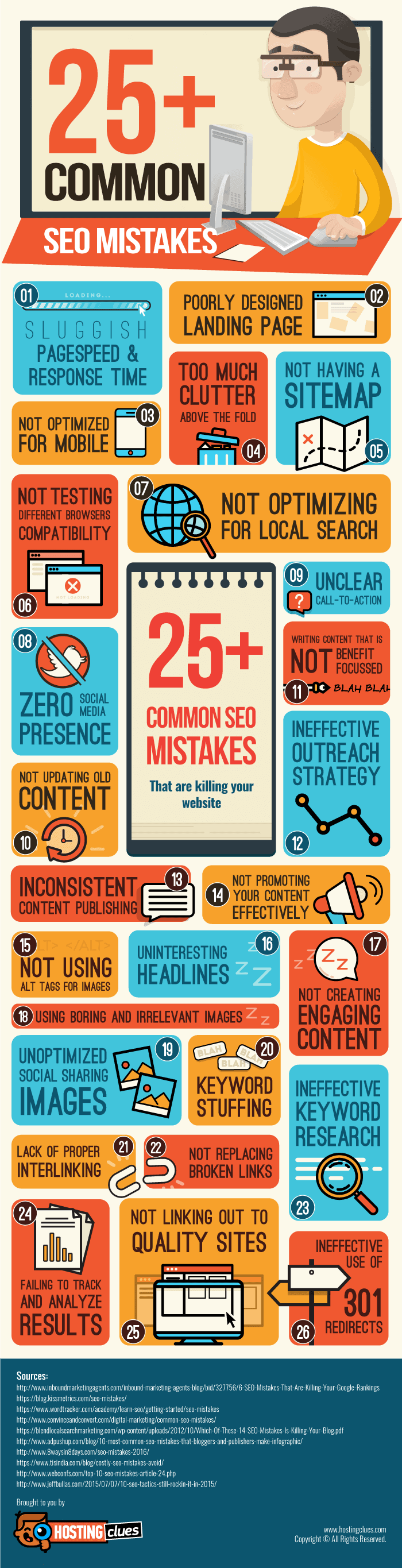
SEO , short for Search Engine Optimization , is one of the key factors influencing the overall success of your online website. You need to f...
Top 5 Ways SEO Can Have Positive Effect on Your Site
The importance of SEO to a business can never be overemphasized. It keeps on showing you how to take your business to the next level. It i...
How to Check if Google Considers your Website as Mobile Friendly
More and more people are using their smartphones these days for web browsing. The improvement in screen size, display quality and great Int...
Top 10+ On-Page SEO Tips to Optimize Your Website (Infographic)
In the early days of search engine optimization, on-page was SEO. As long as you had your meta tags and keyword density in order, you coul...
Top 5 WordPress SEO Plugins for Optimizing Your Blog
SEO is a process which helps you to increase the visibility of a webpage in search engines. Basically, it helps you in creating highly optimized posts that will be easily found by search engines. WordPress SEO plugins help in ensuring that all the aspects of SEO are handled well; these insist you to choose a keyword or phrase on which to focus your post, checking whether you’ve included the keyword in the article or new post.
You’ll have to use the best plugins for WordPress blogs, which will help with improvements of on-page SEO factors and getting your site on the first page of Google SERPs. There are many plugins and you’ll have to choose the best one that gives you a list of things along with a percent score.
How to Make the Most Out of Popular WordPress SEO Plugins?
Using some of the top SEO plugins for WordPress is highly recommendable, but it is not recommended to choose something blindly. WordPress is one of the most commonly used blogging platforms and thus with an efficient CMS, it supports SEO-friendly plugin community and link structure. It is worth considering to apply something that enhances your blog or website in getting higher rankings and creates a bigger audience pool.
How to Improve On-Page SEO with WordPress SEO Plugins?
You can view a copy of your post or page as it would be displayed in the SERPs; before your article goes live, you’ll able to tell how audiences and search engines can view your header. You’ll also come to know whether the SEO descriptions and Meta tags are working just the way you wanted them to. This plug-in will double your chances of success by significantly increasing the number of clicks that your website receives.
Also Check :
Top 10 Essential WordPress Plugins Your Site Needs
Top 5 WordPress SEO Plugins
All-in-One SEO Pack
As the name indicates, it helps in managing different SEO procedures and tasks that you would have probably otherwise manually looked for, as in case of static HTML sites.
It gives your site fundamental information of on-page optimization to raise your website’s presence online. It takes complete care of tasks, like duplicate content prevention, automatic Meta tag generation, etc.
WP SEO by Yoast
It is one of the most popular WordPress SEO plugin with some awesome features like SEO for the post images, keyword optimizer, meta and link elements etc. It is also having XML sitemap , meta title and descriptions and RSS feed optimization. You can also use WP SEO by Yoast for editing your .htaccess and robots.txt file.
It also supports social integration features like Facebook OpenGraph implementation to optimize your WordPress blog perfectly.
Platinum SEO Pack
The upgraded version of the Platinum SEO pack has loads to offer, providing you extended functionality and complete suite for webmasters, who need additional control for optimizing their sites.
It assists you in controlling advanced functionalities like 301 automatic redirects for permalink changes, it has the ability to better control on-page stuffs for both pages and posts. It helps you get rid of duplicate posts and produce keyword or phrases automatically to support your content, making your content all the more search engine friendly.
Also Check :
Top 4 WordPress Mobile Website Plugins
Top 4 WordPress Plugins to Fight Comment Spam
SEO Rank Reporter
This nice plugin provides you the details of the ranking of your blog posts and pages. You can compare your blog for specific keywords or blog of a competitor. You can even set the email notifications which informs you if there is any change in your blog's ranking. The data is updated twice in a week. So, you always get the latest update to optimize your site perfectly.
Google XML Sitemaps
A sitemap is very important for SEO as it allows a lot of subpages to be effectively indexed by search engines. This automatic sitemap generator tool has a great number of advantages similar to support for permalink, generation of pages with navigation, page/category exclusion, and other things that a traditional sitemap doesn’t possess.
It shouldn’t be overlooked by people who run businesses as it has a significant impact on indexing your site’s inner pages. It incorporates highly developed XML sitemaps and then makes Google and Bing aware as and when they are available on the site. These are integrated with original taxonomies and customized post formats.
So, these best WordPress SEO plugins are vastly helpful and come with assurance that you’ll always get great results.
Toby Lee often writes in SEO, SMO, SEM niche, and he has published hundreds of tricks and tweaks for online business marketing. He also helps new bloggers and webmasters in making money online through affiliate marketing.
Since its creation, the WordPress SEO plugins has always been very effective at driving improved traffic to websites and blogs. Its effect...
12 YouTube Rankings Factors You Can't Ignore
The most important YouTube ranking factors are explained below in two categories. Working on them will surely help you in achieving success on YouTube as a video publisher.
YouTube SEO Rankings Factors Tips
Category 1 : Content (What You Control)
YouTube Video Title
You’ll want to have a high click through rate by creating a title that is awesome. You’ll need to do your keyword research accordingly to understand what the users want and need and are searching for. You’ll want the video to follow through on your title, you don’t want to be misleading or else it could negatively affect your rankings.
YouTube Video Description
Create a unique description that explains the points of the video. 1 word URL dropping descriptions do not get the job done. You need to monetize off of each opportunity and your 2nd opportunity that you control is the description of the video. Don’t let it go to waste. You can talk about what makes your video stand out, unique, or different. Remember, the actualy purpose of the description is A Description Of Your Video!
YouTube Video Tags
Create at least 5 tags. You will have these tags be exact match of the keywords you would like to get ranked for. Again, this must also coincide with what your video description says and what the video is about. Title > Description > Tags (include keywords in your description as well i.e. tags)
YouTube Transcription
What the heck is “transcription”? If you don’t already know what this is, I am going to go ahrad and explain this one for you. It’s a Gem! While the actual transcription sucks and will chop up your verbiage 90% of the time, it’s the transcription that Google will decide to use to get your video ranked for your targeted keywords.
YouTube Publisher Authority
Why is this under the category “content”? Because this is something you can control, and that is what we are referring to in category 1. Creating something that Google will see as an authority is a priority you should make for your channel. This comes with consistency. Authority in Google’s eyes is engagement throughout your spread of videos on your channel. Consistency is key. Don’t’ slack off and it’ll get easier and easier to rank for your terms in Youtube.
Also Read : HOW TO : Associate Your Website with Your YouTube Channel for Better Authority and Ranking
Quality Delivery
Quality delivery is in other words “not creating a crappy video that adds little to no value to the end user”. That is Henry’s definition he uses when discussing with clients from his Dallas SEO Company.
Also Check :
The Most Paused YouTube Video Ever
5 Awesome Features of YouTube You Might Not Know
Category 2 : Community Engagement
Didn’t we discuss this already? Yes, however there are 6 more points I’d like to make in regards to what you need in order to rank on Google / Youtube and that is engagement.
Get More Views
Views = Rankings. So, try to perfectly use your social media accounts and sharing connections to get the word out.
Get More QUALITY Views
Google can track how long people watched the video, when and where they dropped off, and where they went afterwards. Often times you delivered your point, point is received, user gets bored, user escapes the rest of the video. Watching a video all the way through is engagement, watching a video for 20 seconds of a 120 second video is no bueno. Not good for engagement. Just shorted your video down to 20 – 22 seconds if that is the case. Alternatively you can re-upload the video and make it engaging throughout the whole video.
Inbound Link Building (aka SEO Link Building)
You want to get links from other youtube channels, other websites, other related niche websites and any website that is relevant to your own and have them link back to you! Google will look for channel links and links to your video itself.
Sharing your new videos own blog. If you don’t share it, why should others. I mean, it’s YOUR video! Enough said.
YouTube Video Embeds
This is people sharing your video through an EMBED code on their very own website. You do have the ability to turn off the embed feature, so make sure you keep this on. Accidents do happen.
Also Read :HOW TO : Embed YouTube Video Channel Feed In Your Blog
YouTube Video Comments and Responses
Ok, this is Key. If someone does comment and respond to your video you MUST reach out to them. Google wants to rank videos that build a following, the more followers you get the more followers they get, the more money Google make. Google is a business after all.
Second, video responses. Get someone to create another video in response to your video. WOW! What? This is one of the hardest ranking factors to signal. It’s also one of the most powerful. This “video response” topic requires a whole post in itself. For now I will leave you with this, incentivize. Give them a reason to react and share your content through their channel.
YouTube Video Likes and Favorites
Get your visitors to like your video and add both you, your channel, and your video to their favorites. This is a fluctuating ranking factor, but keep the numbers steady and Google will reward you for your efforts. The bottom line is this, if you take anything out of this article you can take this to the bank. The more the community interacts with your videos the higher they will rank, hopefully we explained that valiantly in the above text.
Want to learn how to get a video ranked on YouTube ? Well you should! YouTube has about 3 billion hours of video added every month to its s...
Top 10 SEO Tips to Reach the Top of the Search Engines
Best Blogging SEO Tips
Optimize Content
You need to optimize the content that you put on your site. You shouldn't only be optimizing your content for the benefit of search engine results, as you should be primarily focused on your customers and readers and the content that they read on your site. Your content should be presented in a way that your readers will love, as having content people enjoy reading will also help to improve your SEO rankings.
Choose Keywords Efficiently
There are keywords that have been used so many times that there is no use in using them anymore, and, equally, there are keywords that are hardly ever used. You need to keep this in mind when choosing your keywords, so that you choose keywords that people will use, but are also words that haven't become too saturated.
Also Check :
Top 4 Keyword Research Tools for SEO
Treat Your SEO Keywords Like Ladies
Work on Navigation
The type of navigation that your site has also has a big impact. Make sure to have sites that are easy to navigate and make the user feel at ease.
Have Ample HTML Links
When search engines "crawl" into your site, they are unable to fill out forms or read different java scripts. So, the best way to show them the full functioning capability of your site is by leaving HTML links on your main page. This way Google spiders can easily crawl onto the pages and find them.
Image Attributes
The "alt" tag and image captions also play a huge role. Do not leave image descriptions empty - rather make them as descriptive as you possibly can. Using sentences like “click here” or “let’s go” are generic descriptions. You should use "alt" tags as descriptive as possible because search engine spiders can not read an image but they do read the image "alt" and title tags.
Also Read : How to Boost Your SEO and Blog Traffic with Pinterest
Work on Your Homepage
The homepage is the landing page and is therefore the most significant page of the whole site. Make sure to have engaging content that entices readers to read more. It is this page that has the most influence in deciding the fate of your site and your SEO ranks.
Page Titles are Crucial
The titles of your pages are extremely crucial and cannot be ignored. It is important to have the targeted keyword in your title tag as it is the best way of making on-page SEO algorithms work in your favor. Also, choose titles that are unique, as using an oft-used title can cost you dearly.
Have Backlinks
Make sure that other sites link back to your site. It is important to have a link-friendly site. However, people will only link back to your site if you have content worth reading and sharing.
Content is King
No matter how many points and strategies we list, always remember the golden rule that content is king. As long as you post the best content, you are sure to enjoy lots of traffic and healthy SEO rankings.
Stick to Your Domain
Until and unless it is necessary, do not change your domain. SEO algorithms are heavily influenced by how long you have been using your domain. So, stick to the same domain as long as you possibly can. It will be sure to pay off dividends.
Are you looking to reach the top ranks in search engine listings ? Follow the tips below and become a major player in the world of SEO. ...
HOW TO : Use the Google Disavow Tool to Remove Poor Quality Backlinks to Your Website
This summary is not available. Please click here to view the post.
HOW TO : Use the Custom Reports in Google Analytics
Google Analytics is the most widely used analytics software for small, medium and large businesses that Google provides free of charge. It offers some truly great features that allow webmasters to really get to see how their website performs online, who their customers are and where they come from.
While the core features have not changed too much over the years, the integration of certain add-ons and embellishments are definitely apparent, making the tool even more useful than ever. Custom Reports are a fantastic tool that Google Analytics offers and it can really help all online marketers gain effective insight into their online marketing activities.
One of the greatest swings of the Google Analytics has been an increased level of customisation, and this is evident from the Custom Reports feature that can be generated.
Using the Custom Reports in Google Analytics
Why Should You Use Custom Reports?
In simple terms custom reports allows online marketing professionals to create specified reports for clients. Through custom reports you can create tailored reports to view specific data and metrics depending on what you want to look at.
This means that if you want to look at Adwords specifically, you can create a customized report that will look solely at that data. Furthermore you can drill down into this data which can include campaigns, ad groups, keywords and also engagement metrics.
Custom reports are typically formulated by utilising ‘Dimensions’ and ‘Metrics’. Dimensions can be defined as your visitor attributes such as browser, traffic resource, exit page, keyword, session duration, screens etc.). ‘Metrics’ on the other hand can be taken as the real data which is amassed such as clicks, impressions, click through rate and conversions.
Also Check :
Top 4 Free Tools to Monitor Social Media Campaigns
Top 4 Internet Marketing Tools For Small Business
HOW TO : Track Your Twitter Audience on Your Blog
What Can Be Done With The Data?
Business owners and search engine marketing professionals can take advantage of this data as it delivers them a greater insight into their online marketing activities. Reports can be created around Google Adwords, SEO, organic traffic, email marketing, social media and more. It allows anyone with the good analytics skills to really understand the performance of any online marketing campaigns.
By using the Custom Report tool from Google Analytics you are free to craft, save and edit your data if you need to get a deeper view. You are able to select the information that you would like to see, prepared and planned in just the way you want it. This can be hugely beneficial when needing to convey to a manger of client how various campaigns are performing.
Key Benefits
The first and foremost benefit of Google Analytics Custom Reports is that it saves time. It gives the ability to save online marketers mass amounts of reporting time by having all the relevant data gathered and presented effectively. Also you can plot the data against last month’s statistics which then allows you to really see a clear picture of month on month performance.
Also shelf life of each Google Analytics custom report is decided by the analyst and it is there for them to pick out as and when that data is required, for a time period that you want to compare.
Jonathan works at BangOnline.com.au , based in Perth, Western Australia and specialises in SEO, Google Adwords and Google Analytics Reports.Google Analytics is the most widely used analytics software for small, medium and large businesses that Google provides free of charge. It...
How Not to Get Victimized by Fiverr SEO Gigs
Fiverr.com is fast becoming THE marketplace for search engine optimization (SEO) labor. This makes a lot of sense. A lot of the labor that goes into any typical SEO campaign is not all heavy analytical “brain” work. In fact, much of it is repetitive, tedious, and, frankly, quite boring. Fiverr offers SEO companies and individual service providers a ready pool of experienced SEO workers willing to do such tedious work for only $5.

There are many offers along the lines of “Get 50 Page Rank 3+ .edu links”, “I will submit your spun article to 1000 article sites,” or “I will submit your site to the top 100 social bookmark sites.” You get the point. Given the huge amount of submissions and, seemingly, labor expended for such a low price, what's not to like? Quite a bit, actually.
As it turns out, many, although not all, of the SEO deals offered at Fiverr might just prove to be too good to be true. While they are not scams in the classic sense of the word, they do complete the work they promise to do, the actual value of that work can be quite doubtful when it comes to the overall success of your SEO campaign. Here are some red flags to keep an eye out for.
How to Avoid SEO Rip-offs on Fiverr Gigs
Fiverr SEO Red Flag #1: Huge Numbers of Links Offered
Google considers “do follow” backlinks as votes for your website. The more you have of these from the right sites, chances are, the better you will rank on Google. This translates to lots more free search engine traffic. The problem with Fiverr offers that produce a huge number of links in a short amount of time is that they don't appear “natural” to Google.
According to Google's own guidelines, they are looking for sites whose backlink inventory came about naturally as website owners, bloggers, and other Internet users find these sites valuable enough to link to them. Such 'natural' link building happens in periodic and erratic spurts and they usually trickle in. Fiverr SEO gigs that offer to build a huge number of links overnight will not look natural to Google. As a result, your site might get penalized due to this web spam. At best, your site might get “sandboxed”-your rankings are artificially suppressed while your link patterns stabilize. It's anybody's guess when you'll be freed from your sandbox ranking prison.
Also Check :
5 Types of Links to Avoid after Google Penguin Update
Get Your Link Building Campaign Straight In 5 Easy Steps
Fiverr SEO Red Flag #2: Offering Link Placement on High Page Rank Websites
Search engines rank your site based not only how many 'natural' backlinks it gets but also on the quality of the sites linking to your blog. Different search engines determine quality differently. Google uses the Page Rank system. The higher the page rank of a page, the more Google likes this page-whether the page's usefulness or actual quality measures up to its page rank is open to debate. What is indisputable is that Google ranks pages based on its own quality criteria-regardless of whether we agree with them or not. Accordingly, the higher the page rank of the site linking to your site, the better.
Many Fiverr SEO gigs will put your backlink on high page rank pages. There is no doubt that they will do this. The problem is that it might not do your rankings much good. How come? Many misleading “I will add your link on XXX Page Rank 6+” type of offers put your links on pages that already have many backlinks. The amount of “link juice” you'll get from such heavily linked pages is very low to none. To make matters worse, these shady providers don't care which page they put your link on. It is not uncommon to see backlinks being put on non-English pages. This is a problem if your site is in English.

Finally, some unscrupulous offers put your link on pages that have very bad backlinks placed by other SEOs. For example, your link gets put on a PR 6 page but there are Viagra or porn links on that same page. Google pays attention to the pages that link to you and the other pages they link to. You don't want to get penalized due to guilt by association. What's worse is that many of these bad links are spammed to a huge number of pages and being found on the same page as them may make you look like a spammer to Google as well.
Also Check :
Top 5 Worst Practices for SEO in 2012
How To Improve Website SEO Ranking with Social Media Links
Fiverr SEO Red Flag #3: Offering Link Placement on Sites that May No Longer Exist
This problem occurs primarily in some social bookmark or article submission offers. Since these offers seek to put you on a large number of sites, the people offering these deals might not have the time to check if all the sites they are submitting you, are still operational or not. Usually they use some software to automate the process. And that is why, they do not even bother to care if all those submissions are working perfectly or not. Chances are a few have gone out of business or did not re-register their domain.
As a result, you order such a deal thinking you'll get your links placed on X number of sites. It turns out you only get links on a smaller number of sites. What's worse, some of the sites on the lists used by these submitters might be compromised by hackers so when you check to see if your links are live, you get hit by spyware. Make sure your antivirus program is always updated and activated when verifying links!
How Not To Get Victimized By Shady Fiverr Deals
The best way to avoid getting burned by Fiverr deals that possess any of the red flag features described above is to look at the past comments of previous customers. Look for a large portion of complaints. If a provider has more than 5 percent complaints, send questions to the provider. Look for reassurance that you're dealing with a straight shooter. If the provider has more than 10 percent complaints or negative reviews, skip that provider. The pitfalls some Fiverr SEO 'deals' should make clear is that choosing an SEO service provider, much like choosing a SEO Company, takes attention to detail and some critical analysis. If something is too good to be true, it usually is.
Fiverr.com is fast becoming THE marketplace for search engine optimization (SEO) labor. This makes a lot of sense. A lot of the labor that...
How to Boost Your SEO and Blog Traffic with Pinterest
Pinterest is the latest social media website that allows users to “pin” pictures and articles to their virtual corkboard for everyone to see. Through Pinterest, users are able to share their favorite items, unique pictures, and anything else they find interesting with their online friends. Since so many people are using Pinterest on a daily basis, the website can also help businesses boost their SEO efforts. Here are a few tips to consider when integrating Pinterest into your SEO strategy.

How to Boost Your SEO and Blog Traffic with Pinterest
Use Keywords in Descriptions
Using keywords in your descriptions will make it easier for Pinterest users to find your pins and your board. If you are targeting specific keywords through your SEO efforts, you will want to make sure those keywords are included in your descriptions to attract the same type of online consumer.
Also Check :
The Complete Guide to Pinterest
Top 10 Things to Avoid on Pinterest
Write your Own Summary
If you copy and paste an entire post or recipe you are pinning, your Pinterest board will become cluttered and difficult to read. Writing your own summary is the best way to convey what your pin is about without taking up too much space on your board and making it difficult to easily navigate the rest of your pins.
Only Pin Post Pages
If you are pinning an image from a blog post, make sure to pin the image from the actual post and not the homepage. Pinning the image directly from your post will ensure that your followers will be taken directly to the blog post and not your blog’s homepage where the post may have been bumped off the first page. Since you want to send online users to targeted pages of your website, it is important that you pin the appropriate page or blog post on your board.
Spread out your Pins
A common mistake many Pinterest users make is pinning too many images and links at one time. If you are constantly pinning new items to your board, you will flood your followers with new pins and they will be less likely to continue to follow you in the future. Creating a schedule of just a few new pins per week should be sufficient to drive traffic to your website without inundating your followers with new pins.
Also Check :
Facebook vs Pinterest (Infographic)
Why You Should Avoid Pinterest
HOW TO: Find the Original Source of an Image on Pinterest or Any Website

Categorize your Pins
Categorizing your pins is a great way to make it easy for anyone looking at your board to find content they find interesting. It is important to constantly think about the user experience when pinning new items to your board, which is why you should be categorizing all of your pins. This will make it much easier for someone to navigate all of the content you have on your Pinterest board.
Follow the Big Name Companies on Pinterest
One good way to get your brand name out there in the Pinterest community is to follow several well recognized companies on the site. If you can get one of the big name companies on Pinterest to follow your pins, all of the users following the well known company will be more likely to take a look at your board and start following you as well. Also, you can communicate with all of the followers of the well known company and alert them of your Pinterest board as well.
Promote More than Products
If your company sells items online, it is tempting to only want to pin items that you sell. While this is a good way to drive traffic to your website, you want to provide more value to your followers than simply posting images of the products you sell on your site. Posting content to your board that is directly related to your industry and that your followers will find interesting will help you build a lasting relationship with your followers as they know your board will present them with valuable content.
If you are looking to enhance your SEO efforts, consider using Pinterest to drive more traffic to your website. With a proper content strategy in place, Pinterest can provide an excellent boost to your SEO efforts.
Pinterest is the latest social media website that allows users to “pin” pictures and articles to their virtual corkboard for everyone to s...
Top 4 Keyword Research Tools for SEO and Bloggers
In order to have a solid search engine optimization strategy, you need to have great keywords. Choosing the right keywords can be a time-consuming process. Not only should you determine your own list of keywords, but you should also use keyword research tools to determine if the words you chose really are the most valuable and to also see a list of strong keywords that you may have overlooked.
Thanks to the Internet, these tools are readily available (and sometimes even free), and all of them will help you choose the best keywords for your strategy. The following are just a few of the best keyword research tools available to you.

Best Keyword Research Tools for SEO
Google AdWords Keyword Tool
This is one of the most basic tools to have in your pocket. With Google AdWords Keyword Tool, you can enter in a keyword and the tool will show you basic traffic information on the keyword as well as a list of other popular keywords associated with the one you entered. You can even enter in a specific URL and the tool will generate a list of possible keywords for you to use. This tool will also show you how strong each individual keyword is so you know if it will be beneficial to your site.
WordTracker Keyword Research Tool
WordTracker is another great tool that can help you better assess your keywords. Like Google’s Keyword Tool, you can see just how strong a keyword is based on its results. WordTracker provides its results based on daily use instead of monthly like other keyword tools. You can also use this tool to determine which keywords are the most relevant and will give you the best conversion. You can even see the keywords your competitors are using.
Also Check :
Treat Your SEO Keywords Like Ladies
10 Free SEO Tools and What They Can Do For You
How Google Killed the Long Tail Keyword SEO (Infographic)
Google Trends
Google Trends will show you which keywords are popular right now as well as what was popular over the month. This information is based on what was searched on Google over a specific period of time as well as in which parts of the world and in which languages it was searched. There is also a hot trends section that is updated hourly so you can be completely up to date with the most popular keywords.
Google Insights for Search
Google Insights for Search will give you an overview on specific on certain keywords that you enter. You can filter the search based on web, image, news or product and you can even determine the location and time. Google will then analyze your keyword and provide you with a graph that leads throughout your duration and shows you how the keyword has grown, spiked or stayed the same over time. You will even see the most popular results that appear with the keyword as well as a list of the areas that are performing this search.
So if you find yourself in need of a tool for your keyword strategy, make sure to check out all of these. Not only will they give you valuable information, but they’ll help you create the best possible keyword stratagem.
In order to have a solid search engine optimization strategy , you need to have great keywords. Choosing the right keywords can be a time-c...
Why You Need to Stop Writing Blog Posts Around Keywords
It is funny how the faster Google evolves, the slower many bloggers want to adapt to Google's changes. I can understand where they are coming from. Change is a very scary thing. Moreover, it is very easy to get stuck in one's ways especially when the old ways seem so easy and produce so much result with very little efforts. Let us face it. Keyword Sniping used to work beautifully in the past. It is so easy to get tricked into a sense of complacency with keyword sniping.

How Does Keyword Sniping Work?
You find keywords that are related to your blog's main keyword targets. Your blog's main keyword targets are the keywords that you make your money from. You make your money from either collecting the E-mail addresses of the people that are looking for that term, so you can E-mail them offers later or you make money by triggering AdSense ads that are keyed toward those keywords. AdSense bloggers tend to select AdSense niches that pay a lot of money per click.
Regardless of how you monetize your keywords, keyword sniping is fairly uniform. You take the related keywords, you filter them based on their exact match search volume monthly and you correlate that with how many other pages exist in Google's index that are targeted to that keyword. At the end of this process, you end up with keywords that have decent search volumes but have little competition. You then write blog posts around these keywords by mentioning the keyword in the title, mentioning a related keyword in the meta description and then repeating the keyword a certain number of times in the body and also related keywords as subheadings. You also bold certain related keywords to capture the theme of your real keyword target. After you have made these blog posts, you then build backlinks to those posts using your target and related keywords with varying degrees of anchor text randomization. This is classic keyword sniping.
Before Penguin update, this worked like a charm. Whatever it is that you are promoting, as long as it has low level of competition and it has a decent search volume, you are ensured to have many small streams of traffic which add up to a large river. Keyword sniping is not so hot nowadays after Penguin. It still works in certain circumstances, but it is not as hot as before. The truth is Penguin is a warning shot for bloggers to stop basing their posts on keywords. Bloggers should be blogging. Blogging means informing your readers, building your brand, communicating, establishing a discussion, and forming a relationship with your users. It is not about cheap tricks like keyword sniping. That is why Penguin is not only saving the Internet from crappy content but is also saving blogging by cutting down on keyword sniping.
Also Check :
How To Recover from the Recent Google Penguin Penalization
5 Types of Links to Avoid after Google Penguin Update
Why Stop Writing Blog Posts Based on Keywords?
Search Engines Now Focus More on Social Metrics
The key problem that you encounter when you are writing for Google and not for people is that people constitute social media. It is people's interactions that form the bedrock of social media. If you are not writing for people and writing just for search engine robots, then your target audiences are not tweeting about your posts, they are not sharing your stuff on Facebook, and they are not bookmarking you. There is a disconnect in the eyes of Google in regard to your absence of social media footprint and your high rankings on Google index based on your backlinks and your on-page content. This disconnect results in one thing and one thing only after Panda and Penguin--penalization.
Google is using social media signals as a way to gauge how credible real people find your content. You are not going to be credible with people if you write for Google's robot and not for flesh and blood people. One key way you are doing this is if you are just writing your blog post based on keywords. The blog post does not make any sense. It is really gibberish. It is filled with grammar issues. This is easy to detect and label garbage. However, even if you spent some time actually retaining an expert writer for copywriting services, this might not be enough. If the content is not engaging and if it does not address serious questions that are in the minds of the readers, then it is very shallow content. You are certainly in serious danger of being penalized because of its low quality.
Also Check :
How Social Media Sites are Affecting SEO Ranking
7 Reasons Why Social Media is More Important Than SEO
Which Social Media Site is the Best for SEO (Infographic)

Not in Step with Google's Brand Philosophy
Over the past several few years, Google's Eric Schmidt, its head honcho, has been telegraphing to the media on several occasions about the importance of brand. It is as if he is a broken record. It is always brand, brand and brand. I do not think he is just wasting his time nor trying to blow smoke in people's back sides. There is something funky going on behind Google. However damaging Panda and Penguin maybe to many web master's rankings, we have not seen anything yet. If Google actually goes forward with its brand-based approach to search engine ranking, we are going to be standing on the threshold of a brave new world in search technology.
A brand-based ranking system< is just going to blow away so many websites. Sadly, if you are blogging based primarily on keywords, you are missing the memo on Google's upcoming brand-based ranking philosophy. The key here is each and every post in your blog is a form of branding. Either it moves your brand forward or it erodes it. There are no two ways about it. There is no middle ground. When it comes to blogging, you are either going forward or you are stagnating and dying. There is no middle ground. When you are filling your website with blog posts that are merely involved in keyword sniping, you are not creating a brand because it is not very readable. Even if it is readable, no amount of excellent website copywriting can get around the fact that it is shallow content. Branding involves engagement. It involves a two-way dialogue with your target audience. There is no dialogue when you are filling your blog with keyword sniping posts.
No User Loyalty
There are many blog farmers and page rank farmers on the Internet. Let us not lie to ourselves. There are many guys and gals who build blog networks with one goal in mind, which is to sell backlinks. It is a sad reality. Many people would like to keep it hush-hush and under covers, but it is the truth. If the recent de-indexing of some of the most notorious text link schemes on the Internet are not enough to wake you up to this reality, I do not know what will. Blog farming and page rank farming are no longer going to cut it.
Google has been militant about the power of quality content and the power of branding. The recent updates are not exactly there yet to enforce this repeatedly mentioned philosophy, but we are going to get there sooner rather than later, especially considering how fast Google has been evolving lately. Keyword-sniping blog posts do not establish an emotional or personal rapport with users. It has no interest in building a community. Blogs that are filled mostly with just keyword sniping posts or posts aimed intently at just building backlinks are really in danger of being totally decimated by future Google updates. They have no community. They have no interest in building a community. This is the key problem that you have to address.
You stop writing for Google and start writing for people. Find out what your users are interested in. Address questions that drove them to your blog in the first place. Forget about putting keywords in your blog post's titles or repeating the keywords a certain amount of time. Keywords do not matter. People do.
The Bottom Line about Keyword Sniping
By taking care of your blog's visitors and giving them the experience and the content they have been looking for, you are ensuring that your blog and your online properties will have a higher chance of increasing the traffic in the future. The old tricks no longer work. Short-term thinking no longer pays off. It is all about having a plan and all about paying attention to and caring for your website visitors.
This guest post was written by Chris Walker, an SEO copywriter on WebmasterLabor.com who specializes in user-focused traffic strategies. He says "Target keywords, you have traffic for a short period of time. Target people, you will have traffic forever." You can contact him by visiting the http://scr.im/chriswalker
It is funny how the faster Google evolves, the slower many bloggers want to adapt to Google's changes. I can understand where they are ...
Top 5 Worst Practices for SEO
Search engine optimization, or SEO, is one critical aspect of that marketing strategy and one that can be done with mixed success. For every company seeking SEO services it seems there is an SEO expert, but not all experts are created equal. As with any industry, there are SEO experts who offer some of the best solutions in today’s market while there will always be others who are not experienced with SEO and lead their clients down a harmful path. This path often leads to a negative experience and the business owner believing that search engine optimization isn’t worth their time or money.
While many small business owners have no interest in learning the details of search engine optimization, they should still know the basics of what to do and what not to do. That’s why we have compiled a list of five of the worst approaches that inexperienced or unethical web designers and SEO providers use.
Five of the Worst Practices For SEO in 2012
Hidden Content
Some SEO providers use a technique where they hide content on a page in an attempt to increase search rankings. They place keywords on the page that are unreadable to the user but can be found by search engines. This tactic will backfire, especially after recent Google Panda updates, where on-page SEO factors are under extreme scrutinty.
The bottom line? Don’t utilize this technique. Search engines are smarter than some SEO providers give them credit for and this is one such technique that search engines are well aware of. If their spiders identify the usage of such techniques, the website is sure to be penalized and their rankings decrease or even worse, removed from search results entirely.
Overly-Rich Keyword Content
SEO is primarily based on keywords that are used within your content. The keywords should be well-researched since it is the key to drive traffic to your website. However, the keywords also have the potential to let your website down in the search engine rankings if not used in the right way. It is possible to over-think your keyword strategy. Stuffing your content with lots of keywords just to make search engines think your content is super-relevant will be considered spam by search engines. Trying to out-smart search engines using keyword ‘stuffing’ is a major SEO no-no.
Irrelevant Surrounding Content
Picture this, you see a wonderful story on one of your favorite websites. The story is about how a child adopted his first puppy from the local rescue and went on to experience years of joy in his relationship with this puppy. In the last paragraph of the story you find a link to an iPad 2 review. Would that strike you as odd?
Well, search engines would think the same thing. If you’re linking to pages that are not relevant to the content that surrounds your link, you’re sending search engines a strong signal that you’re trying to spam links to artificially improve your rankings. Your tactic will likely have the opposite effect!
JavaScript Navigation
While not all that common, some website developers employ the use of JavaScript to create links that are used to navigate to content pages in their website. This is a bad practice since the spiders are more likely to miss out these links and your child pages will not be indexed. Search engines have gotten better at recognizing and indexing these links, but why take the chance?
Animated Home Pages
A website’s home page has a greater impact on the search engine rankings than any other page. The home page is, afterall, the front door to the site and is most often the page that is linked when referenced by another site. Search engine spiders are driven by the text, content and links found on the home page and they are not designed to pick up the animations on a web page. I
f you are filling your home page with more animations and less text content then you may be losing one of the most critical aspects of SEO – your optimized home page.
Today’s revenue-oriented businesses are increasingly inclined to create an online presence. But a mere presence alone is not enough to produ...
5 Types of Links to Avoid after Google Penguin Update
Know Google's Natural Link Strategy
Generally Google values link as editorial votes. So websites that receive massive votes, which are more valued by searchers should rank higher in Google. Google primarily considers site's quality, relevance and quantity of links. Good links always boost website rankings along with more traffic and profitable conversions. Google checks your link strategies as what types of redirecting links to your site, the time to acquire these links, way of anchor text linking and many more. If Google's algorithm finds things such as, more new links or unnatural anchor text links, then your site gets penalized.
Issues with Inbound Links post Google Penguin Update
Mostly websites that likely lose their rankings, practice keyword stuffing and unnatural pattern of links. Almost all sites that were penalized after the new algorithm change had issues with fake linking strategy. The link profiles were unnatural and spammy links. So these seo tips will let you know about what types of links websites and SEO services company should avoid? Read on to know.
Also Check :
How To Recover from the Google Penguin Updates
Get Your Link Building Campaign Straight In 5 Easy Steps

Link Building Tips and Tricks after Google Penguin Update
Paid Text Links
One way for companies to rank well for a certain term that is against of Google's algorithm is buying links from other sites matching with the exact anchor text. But Google considers this way of linking as paid links for boosting page rank, but not offering any value to searchers.
Spammy Comment
Most of the websites trying to rank their websites unnaturally for specific keywords are hit by Penguin because of two main problematic reasons. Exact anchor text matching found in the signature part of comments and people using spammy user-name with exact anchor text
Low Quality Guest Posts
Moreover guest posts are a professional way to gain worthy links to your website. The websites that are effected by Penguin had site-links that contain low-quality content, which were not so strong. The site mainly focuses on anchor text based links rather than theme of the content.
Article Marketing sites
The websites hit by Penguin had content featuring links with exact match anchor text. Try to avoid this type of link strategy while promoting your site for exceptional success.
Dangerous Web Spammers Links
People should avoid participating in link schemes that are focused to increase your site rankings in Google. Specifically be away from web spammers on the web, as your website ranking gets affected by this type of link schemes.
Conclusion :
Google changed its algorithm in order to get rid of spammers who try to implement inorganic ways to rank their site high in Google ranking. If you are practicing this type of link building tactics, and other black hat methods then you are the one going to be hit by Google Penguin Update. So if you are unable to rank prominently for a long-term on Google, just find out a professional SEO company who offers effective services and guaranteed solutions for Penguin recovery.
Google continuously makes changes in the algorithm of search engine in an effort to serve the best websites and provide better results for s...
Can Negative SEO Really Hurt Your Business? (Infographic)
To make the test as realistic as possible, Tasty Placement used a website that they have owned for approximately two years. Over the past twelve months the website has not received the benefit of any positive advertising, but it was still listed at number three in search engine rankings for a common keyword search string. After a year of maintaining a high rank with no positive advertising, it would seem like the website would have a firm grasp on a high search engine ranking, but Tasty Placement's experiment conclusively proved how incorrect such a theory would be.
The results showed that it only took one month and $45 to effectively ruin a website's search engine ranking. Thanks to the incorporation of 56,000 junk SEO links, their test site dropped down 11 places and ended up on the second page of search results. Most Internet users focus only on the first page of search results, so the impact of dropping to the second page would most likely be quite strong.
Original study & infographic by TastyPlacement.com
Also Check :
How To Recover from the Google Penguin Updates
Which Social Media Site is the Best for SEO (Infographic)
How To Improve Website SEO Ranking with Social Media Links
Can Negative SEO Really Hurt Your Business? (Infographic)

Most companies spend their time and resources focused on positive advertising, but there are some that have been accused of participating in...
How to Optimize Self-Hosted Videos for Better SEO and Visibility
You may think YouTube is the only game in town when it comes to storing and embedding your videos in blog posts, but another great option is hosting your video on your own site. There are tons of reasons why self-hosting your videos are a great idea - the ownership rests with you, you don't have to deal with pesky watermarks from other companies on your content and when users find your video in search engine results, they'll click on your site rather than clicking straight to YouTube.
Self-hosting your videos has one big consideration - visibility. Without built-in keyword and related searches (like you'll have on a third-party hosting site), you have to put a little extra work into your videos. Here are four tips for optimizing your self-hosted videos for greater visibility.

4 Tips for Optimizing Self-Hosted Videos for Better SEO
Use Google Video Sitemaps
Google uses Sitemaps, an XML list of pages on your website or blog, to discover your content and serve it to searchers. Sitemaps are especially helpful with URLs that aren't normally discoverable by Google's normal crawling process, including video, images and code. A visual sitemap of your video can include a bevy of information, including running time, category, content type (i.e. family-friendly or adult only) licenses, metadata and keywords. Google offers tutorials on manually writing your sitemap, and requires the following data for each video in order to display videos in search results: title, description, URL where the video is hosted, thumbnail URL and the raw video URL or URL to Flash video player.
Surround the Video with Great Content
Search engines are on the lookout for fresh, original and most importantly relevant content, and one of the best ways to optimize your self-hosted videos is to load the video landing page with content that's applicable to your video. This can help boost your search engine rankings and improve accessibility for your page - and more information is almost always better for your readers. An easy way to accomplish this is to take your video script and develop a transcript for your video, use a relevant headline in your title and link your video landing page internally on other pages in your website.
Be Social
Your readers and viewers can be your best ally when you're optimizing your hosted videos. Make sure you're allowing embedding for your video for easy sharing (if you're worried about copyright, watermark your video before you post it), submit your video to video-specific search engines (like AltaVista or Truveo), and social bookmarking sites like Pinterest and StumbleUpon. Encourage sharing and commenting among your readers. Great video will beget sharing, which helps optimization immensely.
Use Meta-Data
Meta-data is like a behind-the-scenes look at your video designed especially for search engines. Typically, information in meta-data includes transcripts of conversations, text descriptions of scenes and any music or voiceovers. The text information makes it easier for search engines to "see" your video as a free-standing file - apart from the content on its landing page. Meta-data is a rather technical aspect of video editing. Professional editing software lets you add meta-data easily, as does Adobe Bridge (for after-editing additions). There are also freeware and cost-efficient programs available.
Pat Walton works in tech industry for a Chicago-based video production agency, ActInWebVideo.com, and enjoys blogging about optimizing web videos.You may think YouTube is the only game in town when it comes to storing and embedding your videos in blog posts , but another great option...
How Social Media Sites are Affecting SEO Ranking
Google is transforming itself steadily into a social media tool which results in higher rankings for webpages on the search engine. Social media is quickly becoming a phenomenon that will most likely be here to stay and change the way marketers advertise their products online. Social media sites have multiplied over a relatively short period of time. Google has alluded to using social media to rank search results. As each business and industry is different, so the social media platform should be chosen wisely to gain the most benefit from it. For example, Google Business Page is an ideal avenue to promote a specific new business product or service while gaining followers via tweeting and blogging are useful to get the general word out about a brand or name.
Whether or not it is the quality of the content that is boosting rankings on Google, or if it is the data taken from Facebook that is shared is debatable. Now, users of Google +1 can link their Google profile to Facebook, Twitter, etc. and get personalized search results from the personal information posted on individual social networking pages. The content shared between friends is highly relevant data for Google to use in ranking a particular website or webpage. Friends and groups who have specific tastes in music or movies for example, are oftentimes better indicators of trends than industry experts. In an interview with Google team member Matt Cutts, he states “We do use Twitter and Facebook links in ranking as we always have in our web search rankings, but in addition we’re also trying to figure out a little bit about the reputation of an author or creator on Twitter or Facebook “(Cutts).

Which Social Media Site is the Most Important for SEO?
Getting the Facts on Social Media
There have been several experiments done that have demonstrated sharing on Twitter, Facebook, and Google+ can most definitely have an effect on search results. In several interviews with Google engineers and spokespersons, there have direct quotes stating that Google is using social media signals to enhance “quality.” Probably what this really means is that Google is still in the beginning phases of developing this new technology to retrieve cutting edge results for marketing purposes.
TastyPlacement SEO company out of Texas conducted an experiment in which they created six separate websites. Each had its own domain name and individually offered home service in six different U.S. cities of roughly the same size. The results were interesting and showed a direct correlation between social media and webpage ranking. They are as follows:
- Increasing the number of Google+ Business Page followers yielded the biggest change in position: +14.63
- Tactics to grow the number of Google +1 votes also paid off: +9.44
- Facebook promotion finished in the middle at +6.9
- A better Tweet and retweet strategy resulted in +2.88
- Focusing on getting more Twitter followers came in last and actually decreased search rankings: -1.22.
- The control site, which had no social media activity around it, didn’t experience any meaningful change: -0.11
David, Michael. Infographic: “Testing Social Media Signals in Search.”
Also Check :
Which Social Media Site is the Best for SEO (Infographic)
How To Improve Website SEO Ranking with Social Media Links
Tracking the Ultimate Goals of the Online Marketing Industry
Along with social signals, user behavior is an important component of how Google ranks websites. Behavior includes how long users stay on a site, how often they return, and how much time the user hovers the cursor over a particular item. As the Google+1 button appears on more and more websites, Google will be able to determine quality of various sites as well as valuable individual user data. From a bird’s eye view, the ultimate goal here is to be able to accurately anticipate user’s preferences for products and enable Google to position itself at the forefront of market competition.
In an interview conducted by Kashmir Hill she says, “The Google guys explained how the new recommendation system will be a factor in search. ‘Universally, or just among Google Plus friends?’ I asked. ‘Universal’ was the answer. ‘So if Forbes doesn’t put +1 buttons on its pages, it will suffer in search rankings?’ I asked. Google guy says he wouldn’t phrase it that way, but basically yes” (Henshaw).
In the electronic world we live in, we have been conditioned to expect immediate results. In retrospect, when users go to a search engine, they are looking for instantaneous service in the process of finding whatever it is that they are searching for. Social media data is ratcheting up the competition for companies to more accurately predict what customers want with more efficiency than in the past.
About the Author

Johan Hedin is the Managing Director at MarketingIgnite.com, which is a web marketing company with 14 years of experience. Over the years, he has managed over 200 online marketing projects with his team. All his clients have achieved top rankings in Google for a wide range of competitive keywords. He also offer white- label SEO services to help other SEO companies, Web Development and Hosting companies.
Sources:
Cutts, Matt. “Matt Cutts: Does Google use data from social sites in ranking?” The Leaders Factory. December 21, 2010. Web. June 15,2012
David, Michael. “Testing Social Media Signals in Search.” Infographics. Web. June 15,2012
Henshaw, Jon. “Forbes reports that Google Plus will be universal ranking signal…then pulls the article?” www.raventools.com. August 18. 2011. Web. June 15,2012
Google is transforming itself steadily into a social media tool which results in higher rankings for webpages on the search engine. Social ...